Blog
Krea 2 Turbo in ComfyUI: Low-VRAM Inference Guide
Mickael
mediapixel team
Krea 2 Turbo produces impressive results, but its model files are large enough to make a 12GB GPU look like a questionable target. I wanted to find out whether it was genuinely practical on my RTX 3060, rather than merely possible with very slow generation times or frequent out-of-memory errors.
I therefore ran a controlled ComfyUI benchmark across four resolutions, three step counts, and both the Standard and Reasoning workflows. Each configuration was repeated three times after warm-up, for a total of 72 measured generations.
The good news is that Krea 2 Turbo successfully reached 1920×1080 without an OOM. The more useful result, however, is that 1280×720 at 6 steps provides a much better everyday balance, generating a game-art concept in about 28 seconds on this machine.
💻 Hardware Setup
I ran every test on the following machine:
- GPU: NVIDIA GeForce RTX 3060 (12GB GDDR6 VRAM)
- CPU: AMD Ryzen 5 5500 (6 Cores / 12 Threads)
- RAM: 64GB DDR4
- OS: Windows 11 Pro (x64)
🛠️ Model Configuration
For the clean benchmark, I used the following ComfyUI-ready FP8 files:
-
UNET / Diffusion Model:
krea2_turbo_fp8_scaled.safetensors
Place it inComfyUI/models/diffusion_models. -
Text Encoder:
qwen3vl_4b_fp8_scaled.safetensors
Place it inComfyUI/models/text_encoders. -
VAE:
qwen_image_vae.safetensors
Place it inComfyUI/models/vae.
I kept ComfyUI completely unmodified for this run. With the Qwen3-VL 4B encoder, ComfyUI detects TEModel.QWEN3VL_4B natively and exposes the 12 transformer layers expected by Krea 2, without any custom patch.
Download the workflows and prompts: The Standard and Reasoning ComfyUI workflow files, along with the four structured prompts used for the visual benchmark, are available in the companion GitHub repository.
⏱️ Startup and Warm-up Overhead
Before measuring the warm runs, I recorded the startup and first-load overhead:
- ComfyUI Server Boot Time: 49.30 seconds
- First-Run Warm-up Latency (Standard): 49.72 seconds (Preloads UNET, VAE, and Qwen3-VL text encoder)
- First-Run Warm-up Latency (Reasoning): 65.63 seconds (Preloads additional KreaReason LLM generation weights)
- Peak Warm-up VRAM: 11,753 MB
📊 Standard Workflow Benchmark
For the Standard workflow, I used Krea 2 Turbo directly without the additional prompt-expansion stage. I repeated every configuration three times with different sampling seeds so ComfyUI could not reuse cached results. The values below are genuine warm generation times.
| Resolution | Steps | Min Duration | Max Duration | Avg Duration | Std Dev | Avg VRAM Delta | Max Peak VRAM |
|---|---|---|---|---|---|---|---|
| 1024x1024 | 4 | 22.32s | 24.26s | 23.07s | 1.04s | 2,272 MB | 11,743 MB |
| 1024x1024 | 6 | 32.65s | 32.73s | 32.68s | 0.04s | 2,265 MB | 11,719 MB |
| 1024x1024 | 8 | 43.01s | 43.55s | 43.20s | 0.30s | 2,256 MB | 11,687 MB |
| 1280x720 | 4 | 19.46s | 19.65s | 19.57s | 0.10s | 2,063 MB | 11,716 MB |
| 1280x720 | 6 | 28.37s | 28.53s | 28.44s | 0.08s | 2,060 MB | 11,740 MB |
| 1280x720 | 8 | 37.40s | 37.48s | 37.42s | 0.05s | 1,947 MB | 11,664 MB |
| 1536x864 | 4 | 28.26s | 28.28s | 28.27s | 0.01s | 2,261 MB | 11,758 MB |
| 1536x864 | 6 | 40.82s | 41.38s | 41.06s | 0.29s | 2,622 MB | 11,670 MB |
| 1536x864 | 8 | 53.93s | 54.04s | 53.99s | 0.05s | 2,635 MB | 11,664 MB |
| 1920x1080 | 4 | 45.42s | 45.48s | 45.44s | 0.03s | 3,830 MB | 11,789 MB |
| 1920x1080 | 6 | 66.69s | 66.97s | 66.83s | 0.14s | 4,570 MB | 11,822 MB |
| 1920x1080 | 8 | 88.10s | 88.29s | 88.18s | 0.10s | 4,638 MB | 11,816 MB |
📊 Reasoning Workflow Benchmark
The Reasoning workflow adds the KreaReason node before sampling. It asks Qwen3-VL to expand and reinterpret the prompt, then passes the resulting conditioning to Krea 2 Turbo. As with the Standard workflow, every configuration was repeated three times with different seeds.
| Resolution | Steps | Min Duration | Max Duration | Avg Duration | Std Dev | Avg VRAM Delta | Max Peak VRAM |
|---|---|---|---|---|---|---|---|
| 1024x1024 | 4 | 56.49s | 65.18s | 60.76s | 4.35s | 2,979 MB | 11,523 MB |
| 1024x1024 | 6 | 64.87s | 71.72s | 67.53s | 3.67s | 2,270 MB | 11,666 MB |
| 1024x1024 | 8 | 74.81s | 78.81s | 76.57s | 2.04s | 2,352 MB | 11,631 MB |
| 1280x720 | 4 | 50.63s | 54.72s | 53.15s | 2.20s | 2,165 MB | 11,649 MB |
| 1280x720 | 6 | 62.72s | 67.13s | 64.50s | 2.32s | 2,027 MB | 11,536 MB |
| 1280x720 | 8 | 71.64s | 85.04s | 78.47s | 6.70s | 2,012 MB | 11,516 MB |
| 1536x864 | 4 | 73.15s | 74.53s | 73.78s | 0.70s | 2,752 MB | 11,751 MB |
| 1536x864 | 6 | 87.02s | 89.40s | 88.48s | 1.27s | 2,781 MB | 11,558 MB |
| 1536x864 | 8 | 100.54s | 103.19s | 102.28s | 1.50s | 2,928 MB | 11,785 MB |
| 1920x1080 | 4 | 92.99s | 95.24s | 93.87s | 1.20s | 3,914 MB | 11,785 MB |
| 1920x1080 | 6 | 112.54s | 117.16s | 115.26s | 2.41s | 4,448 MB | 11,783 MB |
| 1920x1080 | 8 | 137.81s | 139.77s | 138.73s | 0.99s | 4,491 MB | 11,717 MB |
📈 Reasoning Overhead Analysis
Reasoning Adds a Significant Per-Generation Overhead
The KreaReason workflow adds approximately 30 to 50 seconds to each generation on this RTX 3060 setup. This additional time comes primarily from the Qwen3-VL 4B prompt-expansion stage rather than from diffusion sampling.
For rapid iteration, the Standard workflow is clearly preferable. Reasoning should be treated as an optional prompt-interpretation tool for complex or final generations, not as a free quality upgrade.
It is also important to understand what Reasoning changes: it does not simply render the same composition at a higher quality level. It expands and reinterprets the prompt, which can significantly alter the subject, silhouette, environment, framing, and visual details.
Here are three representative comparisons:
| Configuration | Standard (Avg) | Reasoning (Avg) | Overhead (Sec) | Overhead (%) |
|---|---|---|---|---|
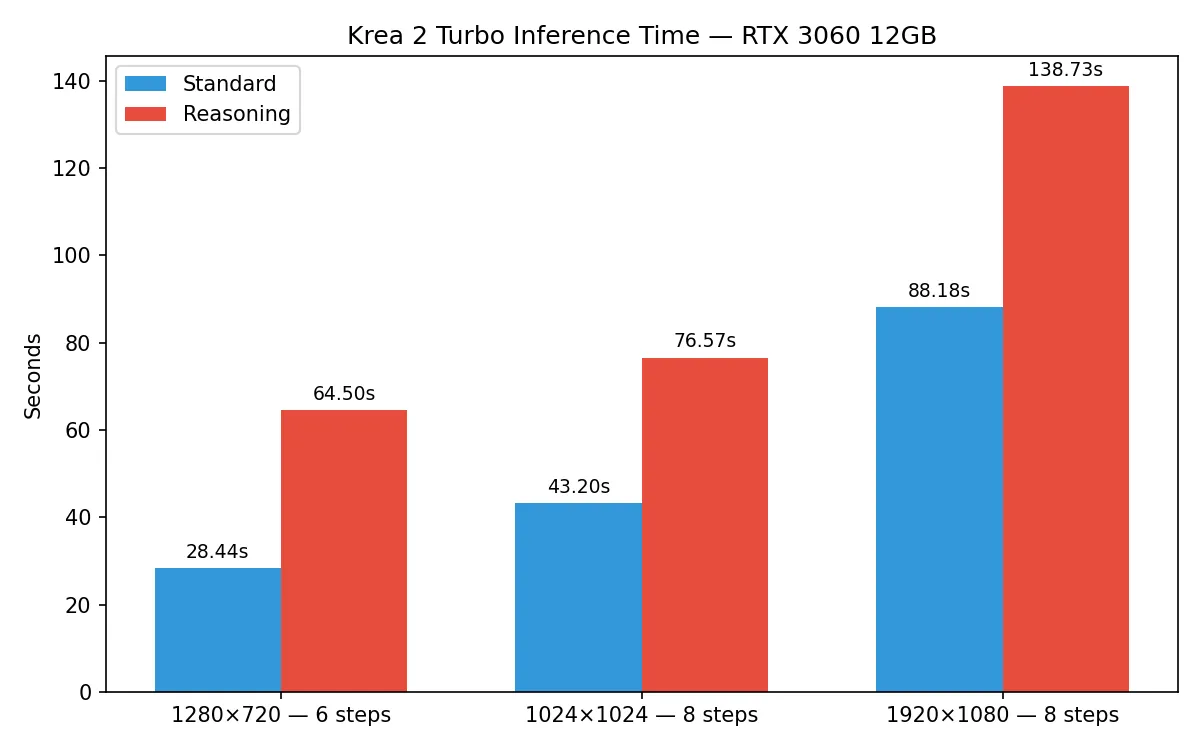
| 1280x720, 6 steps | 28.44 s | 64.50 s | +36.06 s | 126.79% |
| 1024x1024, 8 steps | 43.20 s | 76.57 s | +33.37 s | 77.25% |
| 1920x1080, 8 steps | 88.18 s | 138.73 s | +50.55 s | 57.33% |
Performance Chart Comparison
⏱️ Choosing Between 4, 6, and 8 Steps
In practice, the step count is the easiest way to trade speed for refinement:
- 4 steps: Fast drafts and prompt exploration.
- 6 steps: Best speed-to-quality compromise. Provides fully resolved compositions while keeping iteration speed fast.
- 8 steps: Best suited for final presentation renders, detailed concept images, and important hero asset explorations.
Reviewing the Standard widescreen configurations (1280x720) highlights how these steps translate to clock time:
- 4 steps: 19.57 seconds
- 6 steps: 28.44 seconds
- 8 steps: 37.42 seconds
1280x720, Standard, 6 steps is the recommended iteration sweet spot on this machine, offering detailed game-asset concepts in under 30 seconds.
🚀 Recommended Configurations
1. Fast Drafts
- Resolution:
1280x720 - Workflow:
Standard - Step Count:
4 steps - Avg Timing: 19.57 seconds
2. Iteration Sweet Spot
- Resolution:
1280x720 - Workflow:
Standard - Step Count:
6 steps - Avg Timing: 28.44 seconds
3. Final Hero Render
- Resolution:
1920x1080 - Workflow:
Standard - Step Count:
8 steps - Avg Timing: 88.18 seconds
4. Optional Prompt Expansion
- Resolution: User choice (e.g.
1024x1024or1280x720) - Workflow:
Reasoning - Usage: Trigger Reasoning only when a complex prompt benefits from reinterpretation.
- Overhead: Expect approximately 30 to 50 additional seconds per generation. Reasoning is not a default quality mode.
🖼️ Selected Visual Comparisons
I generated more comparison grids than I needed for the final article. The six below are the most useful because each one illustrates a specific finding without turning the page into a full benchmark archive.
Step Count: Sci-Fi Cargo Crate
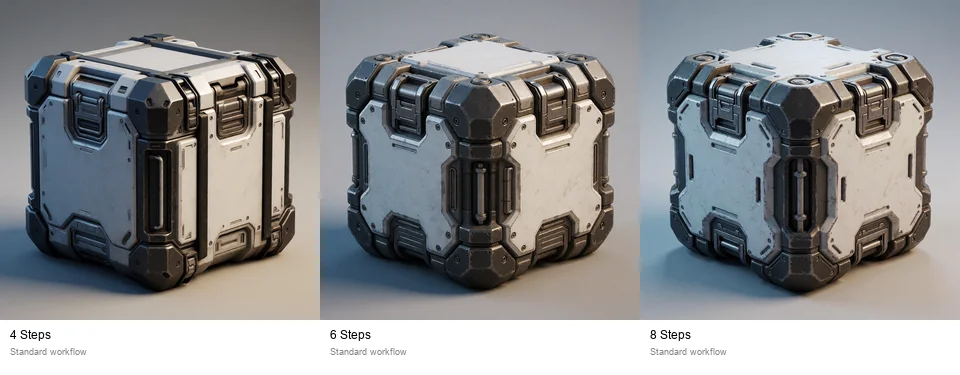
The crate is already coherent at 4 steps. Six steps improve structure and material definition, while 8 steps mainly add polish rather than changing the concept completely.
Resolution and Aspect Ratio: Sci-Fi Cargo Crate
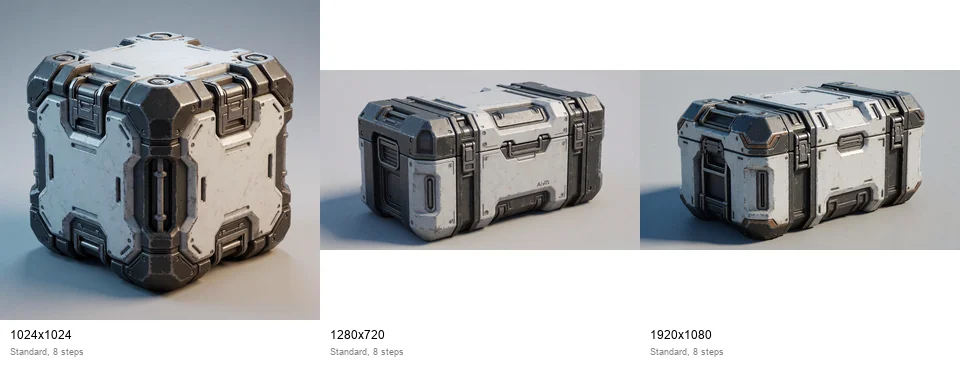
This comparison shows why resolution and framing cannot be separated here: moving from square to widescreen changes the composition as much as the pixel count.
Standard vs Reasoning: RPG Blacksmith Carriage
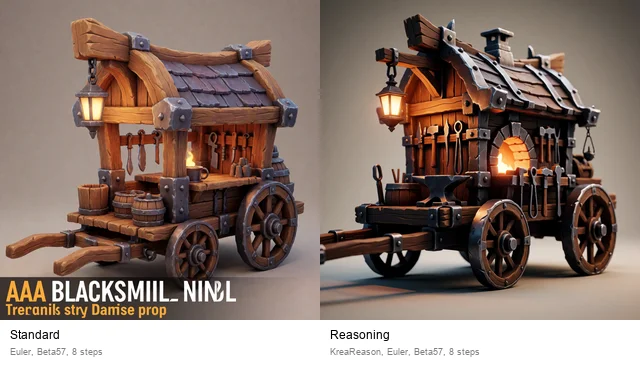
Reasoning does not merely sharpen the same cart. It reinterprets the design, adds a more elaborate forge structure, and changes the overall silhouette.
Standard vs Reasoning: Cinematic Corridor and Canyon
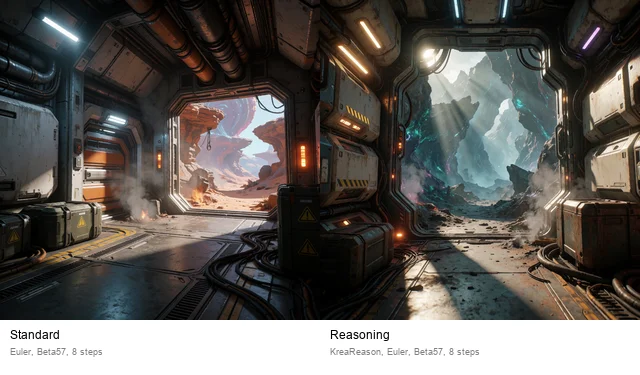
This is the clearest example of Reasoning behaving like a prompt rewrite. The environment, architecture, lighting, and framing all change substantially.
Resolution and Aspect Ratio: Cinematic Corridor and Canyon
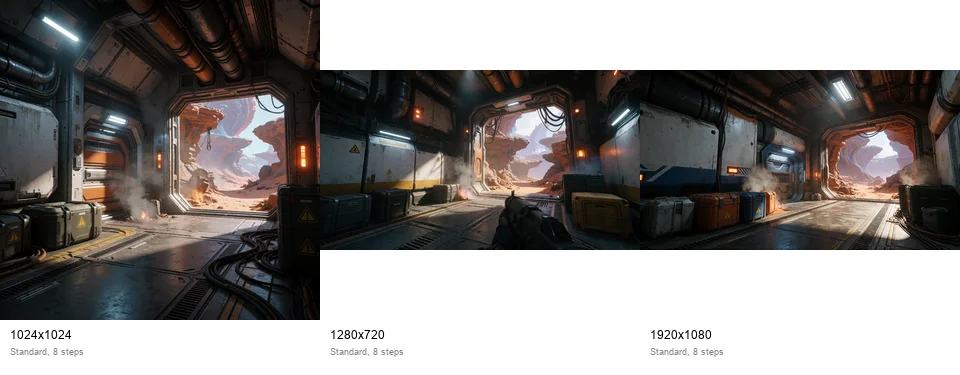
The Full HD frame gives the scene more horizontal space, but it should not be read as a simple detail upgrade because the wider canvas also changes the layout.
Step Count: Powered Armor Suit
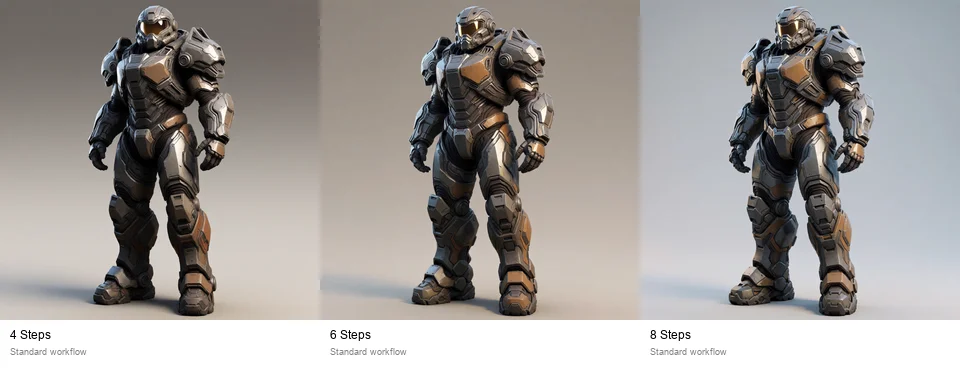
The armor remains recognizable at every setting. Four steps are useful for quick design exploration, while 6 and 8 steps produce cleaner surfaces and more resolved mechanical details.
📐 Resolution and Aspect-Ratio Note
The resolution comparison visual grids compare a square format (1024x1024, 1:1) to widescreen landscape layouts (1280x720 and 1920x1080, 16:9).
Composition differences between these cells stem from both the pixel density changes and the shifted aspect ratio. A wider frame changes how the model arranges environmental objects and frames the subject.
For strict resolution testing at a locked aspect ratio, a future benchmark could compare:
1024x576(16:9)1280x720(16:9)1536x864(16:9)1920x1080(16:9)
📝 Unwanted Text in Game-Asset Prompts
In game-asset generation, some of the generated images exhibited text-like typographical artifacts (e.g. garbled letters on panels or poster backgrounds) even though the prompt explicitly requested no text, no logo, no UI.
Expressions in the prompt such as:
AAA game-artproduction assetpresentationkey artconcept sheet
can encourage the model to produce typography. I found it safer to replace them with cleaner, object-only descriptors:
high-end stylized game prop rendersingle isolated subjectclean studio backgroundproduction-ready design
The blacksmith cart is a good example: some outputs gained catalog-style lettering even though the prompt explicitly asked for no text. I kept those artifacts in the comparison images because they are part of the model’s actual behavior.
💾 VRAM and Offloading Observations
Because the combined weights of the FP8 quantized Krea 2 DiT model (~12.5GB) and the Qwen3-VL text encoder (~5.2GB) exceed the physical VRAM limits of the card, ComfyUI relies on PCIe dynamic weight swapping.
During the text-encoding phase, the text encoder is loaded into VRAM. During the sampling phase, the text encoder is offloaded to system memory and the DiT weights are brought in. This offloading process introduces a constant PCIe swap overhead of ~3.5s to 4.5s at the beginning of each sampler execution.
⚠️ Limitations
- This benchmark covers only
krea2_turbo_fp8_scaled.safetensors; I did not compare the BF16, INT4, MXFP8, or NVFP4 variants. - The machine has 64GB of system RAM. I did not test the same workflow with 32GB or less, so the results should not be generalized to lower-RAM systems.
- The VRAM baseline includes normal Windows and display-driver usage.
- PCIe offloading speed depends on the motherboard, PCIe generation, lane width, and other local system activity.
- Timed repeats used different seeds to bypass ComfyUI caching. The dedicated visual comparison grids used fixed seeds where a controlled image comparison was required.
🏁 Final Conclusion
On this machine, Krea 2 Turbo FP8 is not merely capable of starting on a 12GB card: it is practical enough for regular local iteration.
The most useful everyday setting was 1280x720, Standard workflow, at 6 steps, averaging 28.44 seconds. Full HD also completed reliably without an Out-Of-Memory error, but the maximum observed VRAM usage reached 11,822 MB, leaving very little headroom.
These results apply specifically to an NVIDIA GeForce RTX 3060 with 12GB of VRAM and 64GB of system RAM.
📝 Article Takeaways
- For daily iteration,
1280x720, Standard workflow, and 6 steps gave the best balance at 28.44 seconds per image. - Reasoning is a prompt-expansion mode, not a general quality switch. It noticeably changes interpretation and adds roughly 30 to 50 seconds per generation.
- Full HD generation worked without OOM, but it pushed the RTX 3060 close to its VRAM limit, so it is better reserved for final presentation renders.
What did you think of this post?
Share your feedback in one click!
Comments (0)
Join the discussion and share your thoughts
Leave a comment
No comments yet. Be the first to share your thoughts!
Related Articles
Continue reading with these posts and tutorials
Qwen Image 2.1 vs ERNIE, Krea 2, HiDream and Z-Image on RTX 3060 12GB
Review draft of the final five-model 1024x1024 benchmark on an RTX 3060 12GB. Krea 2 Turbo finished first, ERNIE followed, and Z-Image-Turbo was the fastest retained workflow.
Sep 28, 2026

Mage-Flow Turbo vs FLUX.2 klein 4B on an RTX 3060 12GB
Which compact 4B model offers the better local workflow? Across 30 matched configurations on an RTX 3060 12GB, Mage-Flow generated images faster, while FLUX.2 klein produced cleaner results and the better overall quality/speed balance.
Jul 30, 2026

Mage-Flow vs Krea 2 Turbo on 12GB VRAM
A 60-image ComfyUI benchmark comparing generation speed, memory usage, character fidelity, photography and image quality on an RTX 3060 12GB.
Jul 28, 2026