Blog
Mage-Flow Turbo vs FLUX.2 klein 4B on an RTX 3060 12GB

Mickael
mediapixel team
Which compact 4B model offers the better local workflow? Across 30 matched configurations on an RTX 3060 12GB, Mage-Flow generated images faster, while FLUX.2 klein produced cleaner results and the better overall quality/speed balance.

Update: Shortly after this benchmark was published, Microsoft temporarily made some Mage-Flow repositories unavailable while the model family was reportedly being revised. The results in this article refer to the original released checkpoints, identified by their recorded SHA-256 hashes.
A reader made a fair point after my previous Mage-Flow versus Krea 2 benchmark: Krea 2 is a much larger model, so perhaps a compact 4B image generator should also be compared with another 4B model.
That did not make the previous comparison invalid. It answered a useful question about extreme generation speed versus higher-end visual quality. This follow-up asks a narrower one: if Mage-Flow is compared with another compact model instead, does its softer rendering still look like an unavoidable 4B trade-off?
To find out, I reused the exact same 12 prompts across the same 30 seed-and-resolution configurations from the previous campaign, then added one matching generation pass with FLUX.2 klein 4B. Mage-Flow remained faster, but the quality gap was no longer as extreme. FLUX.2 klein usually produced cleaner faces, hands, materials and backgrounds while still completing most 1024×1024 images in roughly eight to nine seconds on my RTX 3060.
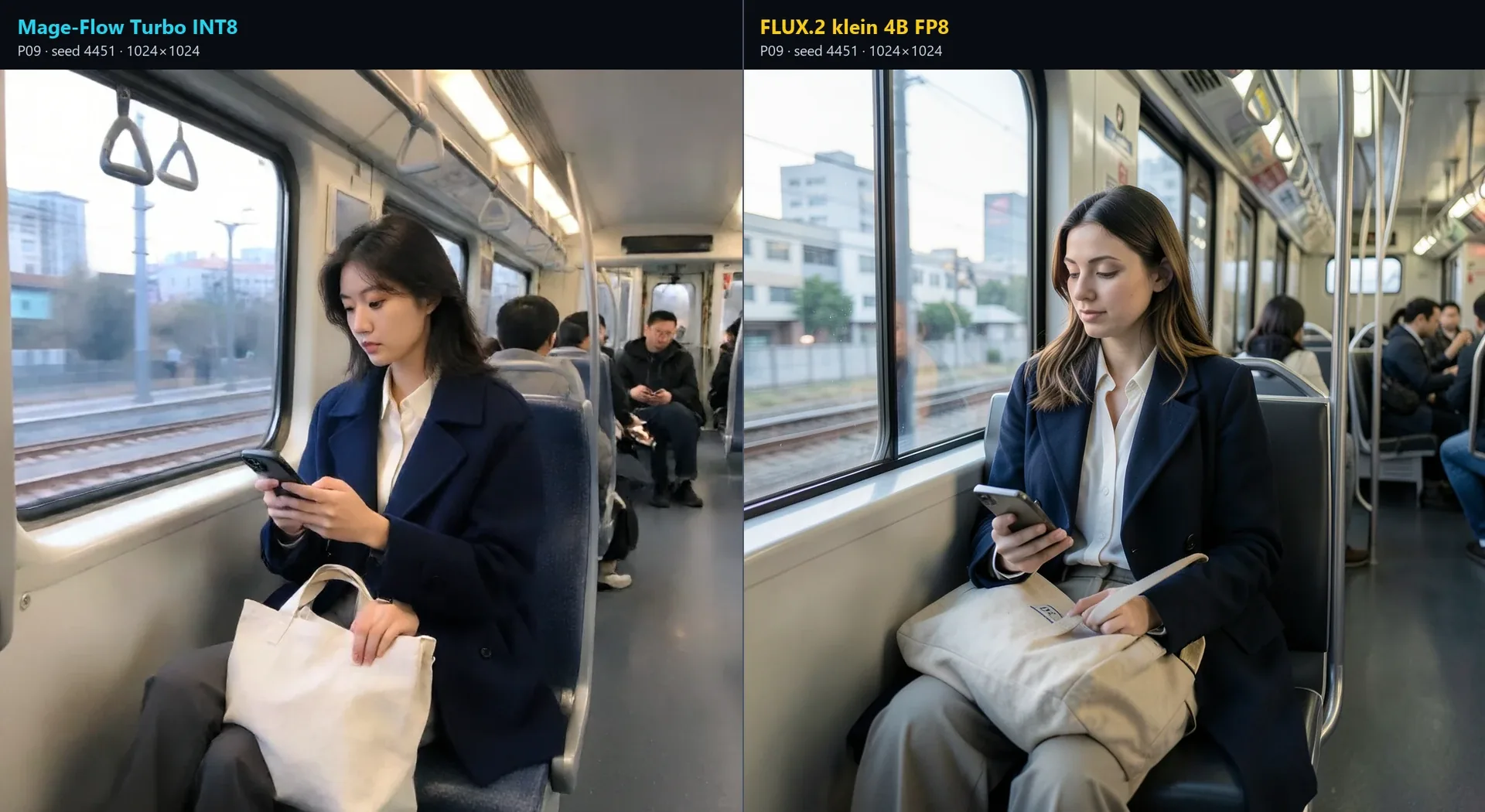
FLUX.2 klein correctly separates the phone and tote-bag interaction, while the Mage-Flow image contains an additional visible hand.
The Short Answer
- Mage-Flow Turbo INT8 is faster. Across all 30 matched pairs, the median FLUX/Mage total-time ratio was 2.54×.
- FLUX.2 klein 4B is the stronger general-purpose model for this tested prompt set. It more consistently produced structured faces, coherent hands, separated materials and clean background geometry.
- Both pipelines filled the RTX 3060’s 12GB VRAM budget. FLUX used about 3.5 GiB more peak physical RAM and 3.0 GiB more Windows commit.
- FLUX did not win every prompt interpretation. Mage-Flow preserved the requested supermarket produce comparison more clearly and retained a stronger Halo ring cue in one Master Chief composition.
- Canonical fidelity remains difficult for both compact models. The Solid Snake pair becomes two generic tactical soldiers even though FLUX renders the cleaner image.
My practical conclusion is straightforward: Mage-Flow is the better minimum-latency model, while FLUX.2 klein offers the better overall quality/speed compromise between these two compact pipelines.
Why Compare Two 4B Models?
The previous test compared Mage-Flow Turbo with Krea 2 Turbo. Mage-Flow was approximately 13–18× faster in that dataset, but Krea 2 was clearly stronger on faces, hands, anatomy, materials and cinematic environments.
That comparison remains useful when the real workflow decision is fast iteration versus a more polished final result. It does not isolate model size, however. Mage-Flow uses a compact 4B diffusion model, while Krea 2 belongs to a substantially larger class.
FLUX.2 klein makes the follow-up more balanced. Its distilled 4B checkpoint is also designed for fast four-step generation, so both models target practical local use rather than long high-end sampling runs.
This is a size-matched comparison at the diffusion-model level, not a claim that the complete pipelines have identical architectures or memory footprints. Both also rely on separate 4B text encoders and model-specific VAEs.
The question therefore changed from “Can Mage-Flow replace Krea 2?” to:
Which compact 4B pipeline gives the more useful balance of speed, memory and image quality on a 12GB GPU?
Test Hardware and Pipelines
The benchmark ran locally in one ComfyUI environment:
- GPU: NVIDIA GeForce RTX 3060 12GB
- System RAM: 64GB
- Operating system: Windows
- ComfyUI: 0.28.0
- Batch size: 1
- LoRA or adapter: none
- Prompt expansion: none
- Upscaling: none
- Post-processing: none
- Decode: full model-specific VAE decode
This was an end-to-end practical comparison. Each architecture used its validated native pipeline rather than being forced into an artificial common scheduler.
Mage-Flow Turbo INT8 ConvRot
- 4B diffusion model
mage_flow_turbo_int8_convrot.safetensors- INT8 ConvRot
- 4 steps
- CFG 1.0
- Euler sampler
- simple scheduler
- native flow shift 6.0
- Qwen3-VL 4B BF16 text encoder
- Mage-Flow BF16 VAE
FLUX.2 klein 4B FP8
- official distilled 4B checkpoint
flux-2-klein-4b-fp8.safetensors- mixed FP8, BF16 and FP32 tensors
- 4 steps
- guidance 1.0
- Euler sampler
- native
Flux2Scheduler - internal ComfyUI FLUX.2 sampling shift 2.02
- Qwen 3 4B BF16 text encoder, loader type
flux2 - FLUX.2 VAE
The same numeric seeds were used for matched configurations, but equal seed numbers do not create identical latent noise across different architectures. The comparison controls prompts, seed values and dimensions; it does not claim pixel-aligned starting noise.
Reusing the Previous 30-Image Campaign
I did not regenerate Mage-Flow. Every existing Mage image was revalidated against its recorded prompt hash, seed, dimensions, workflow hash, component hashes and image SHA-256, then copied byte-for-byte into the follow-up dataset.
Only the 30 matching FLUX.2 klein images were newly generated:
| Group | Mage reused | New FLUX | Resolution |
|---|---|---|---|
| Pop-culture campaign | 18 | 18 | 1024×1024, 6 prompts × 3 seeds |
| Pop-culture high resolution | 6 | 6 | Prompt-specific portrait and landscape formats |
| Photography | 6 | 6 | 1024×1024 |
| Total | 30 | 30 | 30 matched pairs |
The campaign completed with 60 validated images, zero failures, zero retries, zero ComfyUI restarts, zero Mage-Flow regenerations and no new Krea images.
The pop-culture prompts covered Samus Aran, Lara Croft, Master Chief, Kratos, the Terminator and Solid Snake. The photography set covered a café, supermarket, commuter train, laundromat, florist and architecture studio.
Speed
Mage-Flow retained a clear speed advantage, although the gap was far smaller than it had been against Krea 2.
| Dataset | Mage median | FLUX median | Median paired FLUX/Mage ratio |
|---|---|---|---|
| Pop culture, 1024×1024 | 3.4 s | 7.6 s | 2.30× |
| Photography, 1024×1024 | 3.3 s | 9.3 s | 2.83× |
| Pop culture, high resolution | 8.9 s | 24.3 s | 3.04× |
| All 30 configurations | 5.1 s | 9.2 s | 2.54× |
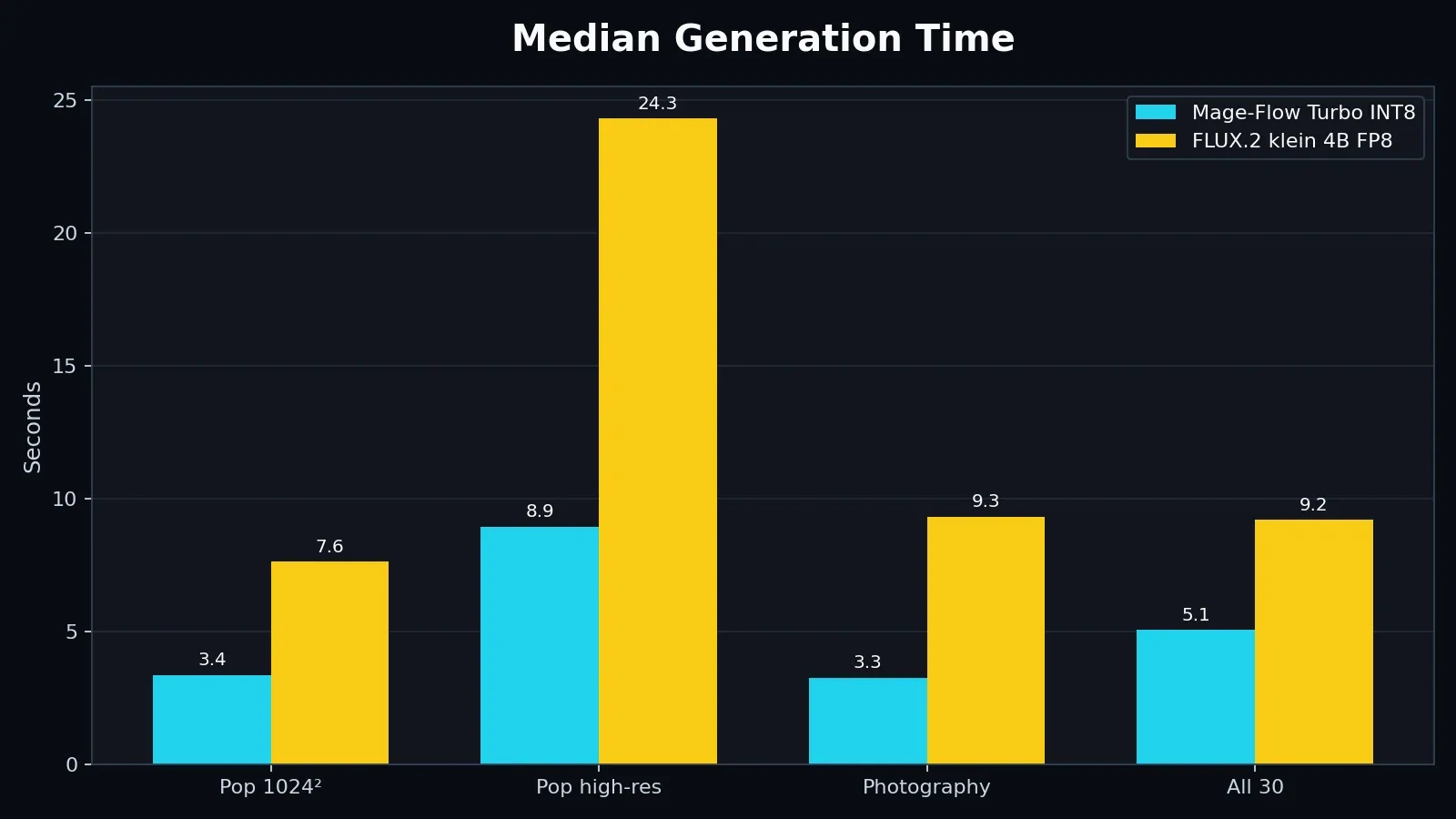
FLUX remained fast enough for an interactive local workflow, but Mage-Flow completed the matched configurations substantially sooner.
Across the full mixed-resolution dataset, Mage averaged 7.1 seconds and FLUX averaged 11.9 seconds. The mean paired ratio was 2.14× and the median was 2.54×.
Those total-time values need one qualification. The Mage measurements were inherited from the earlier campaign, so prompt-encoding and cache states do not line up perfectly with the new FLUX execution order. This is why a few total-time pairs behave unusually even though the underlying sampler remains faster on Mage-Flow.
Sampler-only timing reduces that ambiguity. Across all 30 pairs, the median FLUX/Mage sampler ratio was 3.42×. The median sampler ratio was 3.27× in the high-resolution group and 3.63× in the photography group.
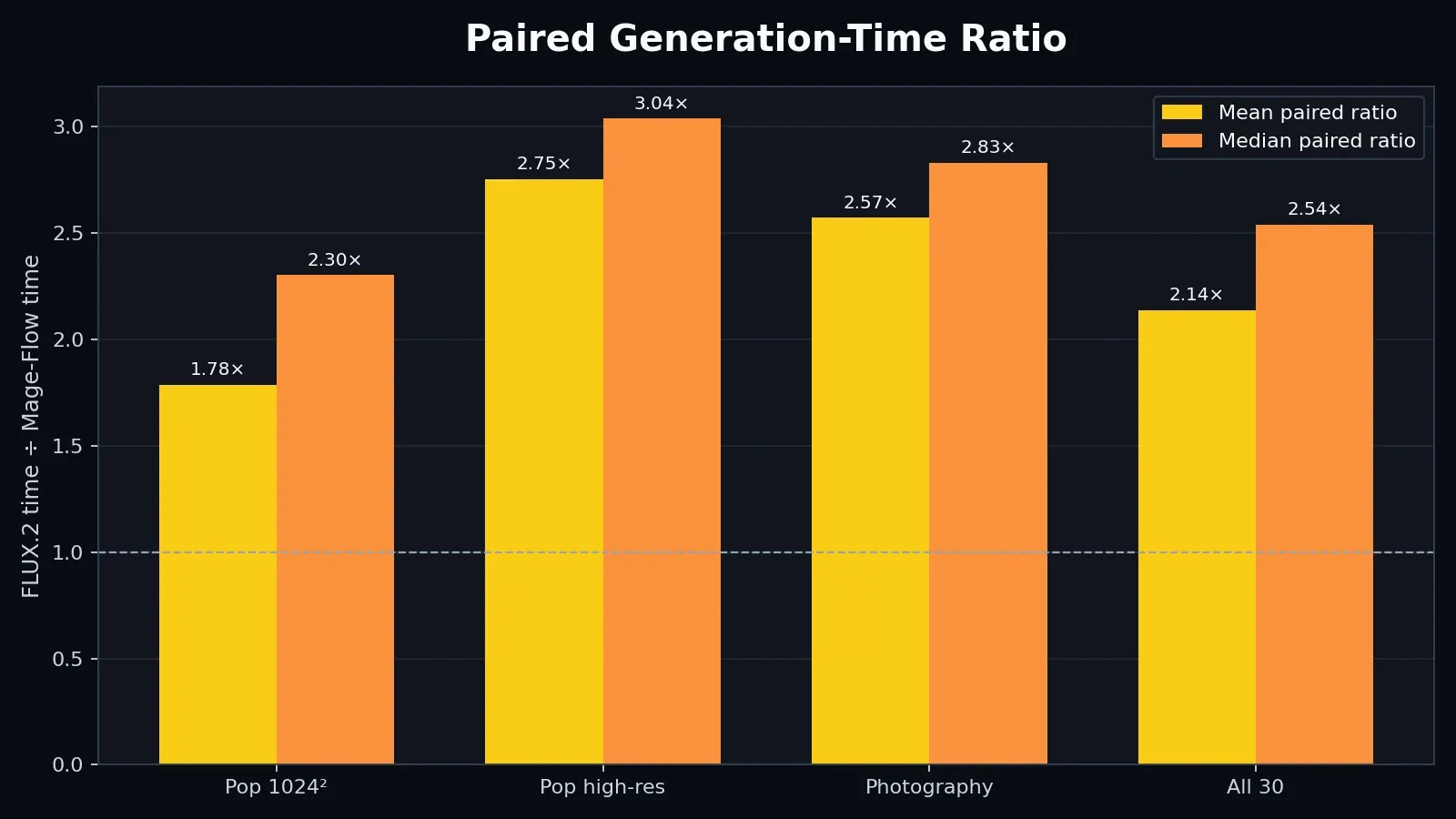
A ratio above 1 means FLUX.2 took longer. Group-specific values are more meaningful than one overall mean because the campaign mixes several output sizes.
In practice, Mage-Flow remains the model for trying many directions quickly. FLUX.2 klein asks for a few more seconds at 1024×1024 and a much larger increase at high resolution, but it is still dramatically faster than the Krea 2 reference from the previous article.
VRAM, RAM and Windows Commit
The shared 4B parameter class did not translate into low practical VRAM usage. Both complete pipelines effectively filled the 12GB GPU:
- Mage-Flow peak VRAM: 11.85 GiB
- FLUX.2 klein peak VRAM: 11.87 GiB
The meaningful difference appeared in host memory:
- Mage-Flow peak physical RAM: 19.81 GiB
- FLUX.2 klein peak physical RAM: 23.27 GiB
- Mage-Flow peak Windows commit: 35.12 GiB
- FLUX.2 klein peak Windows commit: 38.12 GiB
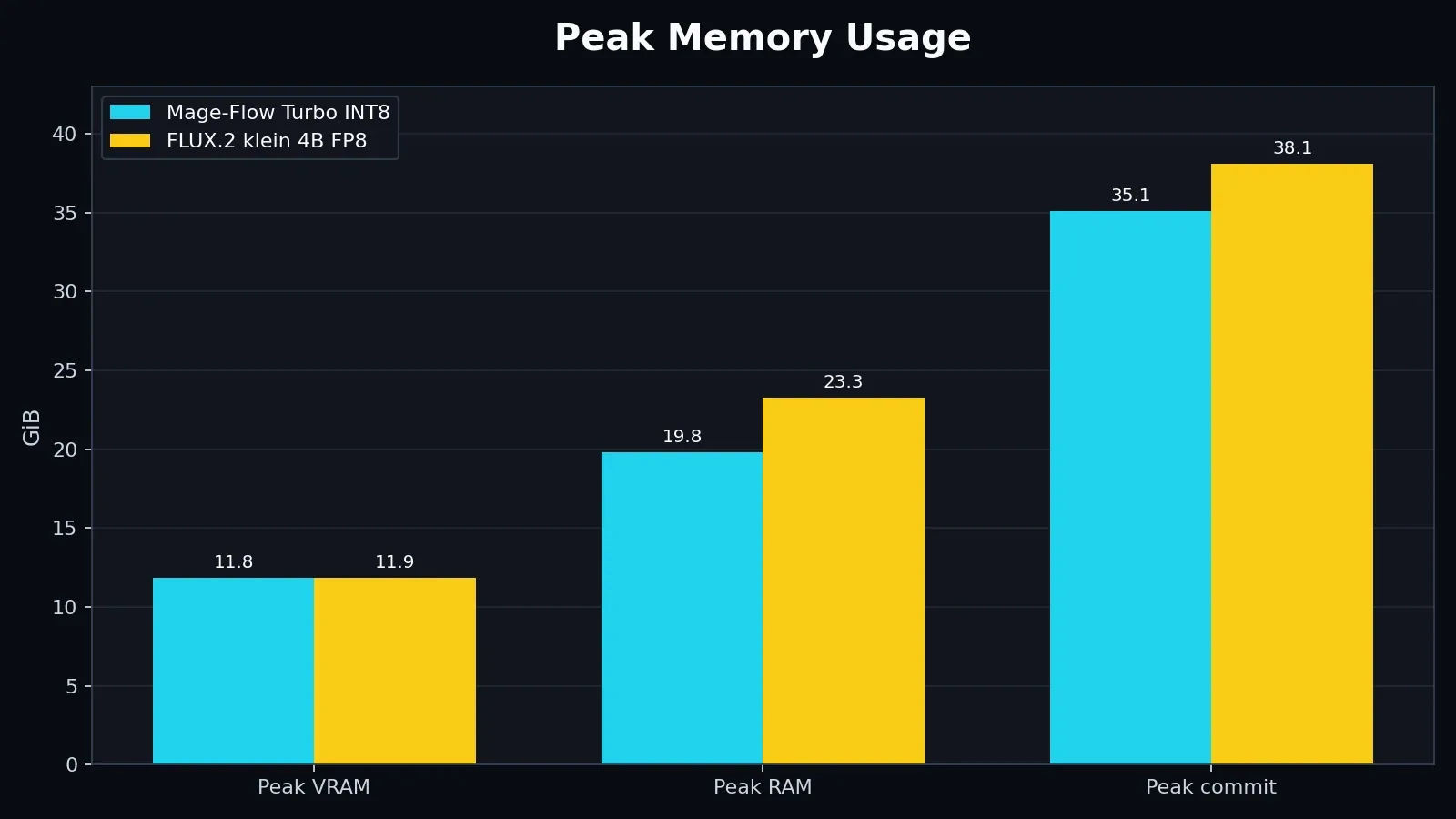
Both models reached the practical VRAM ceiling. FLUX required about 3.5 GiB more peak physical RAM and 3.0 GiB more peak commit in this run.
Checkpoint parameter count is therefore only part of the local-memory story. The text encoder, VAE, runtime precision, staging and offloading behavior all contribute to the complete pipeline.
Pop-Culture Characters
The character prompts exposed three separate questions that are easy to mix together:
- Is the image visually polished?
- Does it follow the requested scene?
- Does it preserve the canonical character?
FLUX usually won the first question. It delivered cleaner anatomy, stronger facial definition and better-separated materials. It did not always win the other two.
Lara Croft
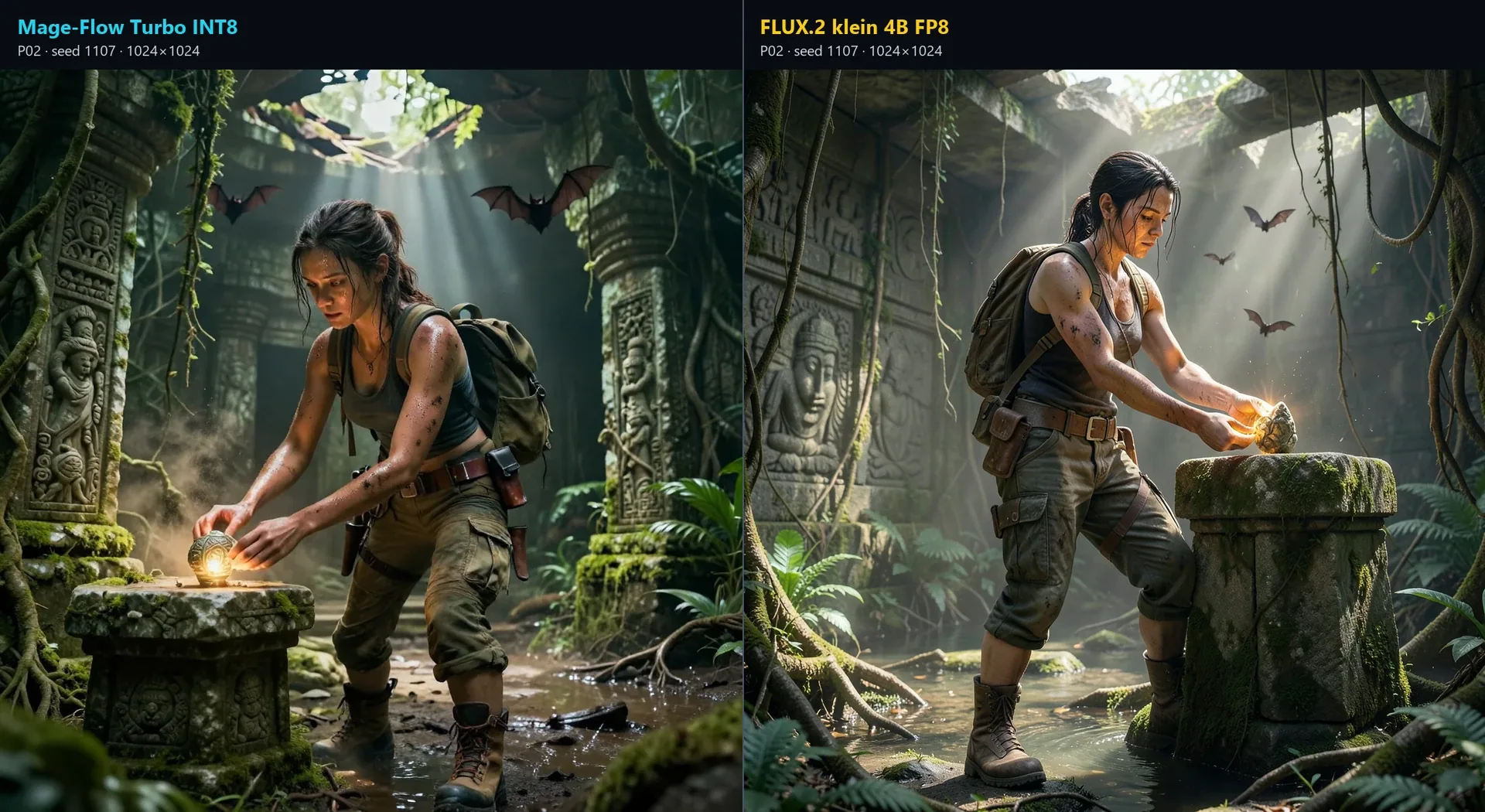
FLUX gives Lara a more natural full-body silhouette, clearer facial structure and better-separated clothing and skin materials in this pair.
The native face crop makes the rendering difference easier to see. Mage-Flow’s face is softer and less structured, while FLUX preserves more distinct facial planes, skin detail and hair.
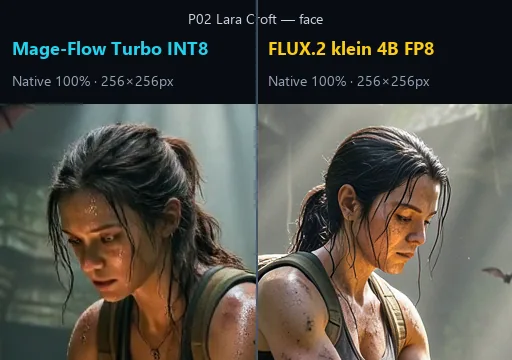
A native crop reveals differences that are less obvious when the full 1024×1024 images are reduced to webpage size.
Master Chief and the Halo Ring
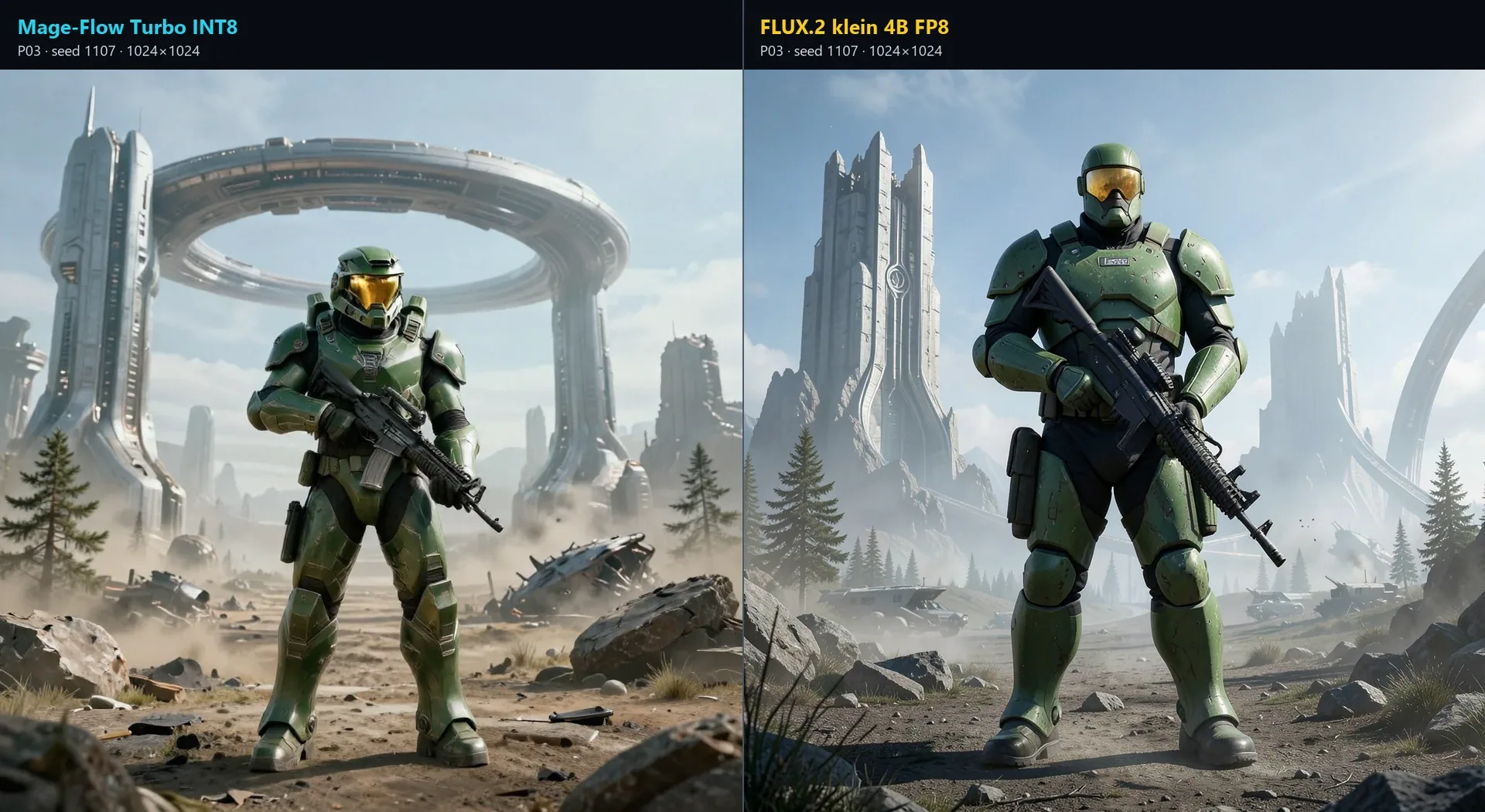
FLUX produces the cleaner armor and environment, while Mage-Flow makes the requested Halo ring cue more explicit in this composition.
The FLUX image has stronger hard-surface definition and a more controlled silhouette. Mage-Flow, however, places a large curved ring structure directly behind the character. That is an important reminder that higher visual polish is not the same as more exact prompt adherence.
Solid Snake
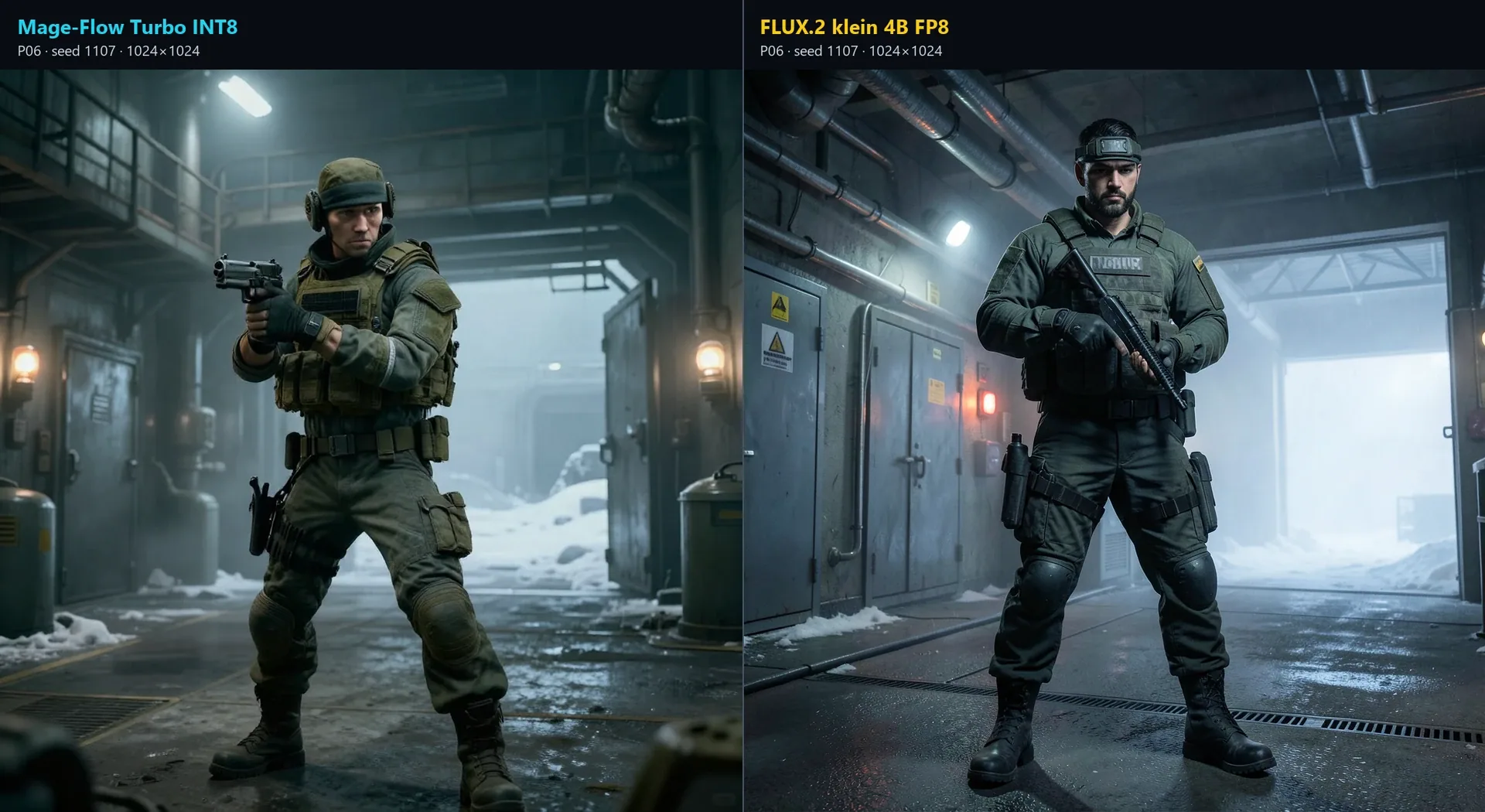
FLUX renders the cleaner tactical scene, but both outputs drift toward generic soldiers rather than preserving a convincing Solid Snake identity.
This is where canonical fidelity becomes its own category. FLUX improves fabric, equipment and background geometry, yet the named character is still weak. A cleaner failure to preserve identity remains a fidelity failure.
Everyday Photography
The six ordinary scenes remove franchise knowledge from the comparison. They ask whether the models can produce believable people, hands, objects, fabrics and contemporary spaces.
FLUX generally looked more photographic. Faces were more structured, small objects were cleaner and background lines were less muddled. Mage-Flow was not uniformly poor, however. Its café, laundromat, florist and studio outputs remained credible at normal display size, and some prompt details were handled well.
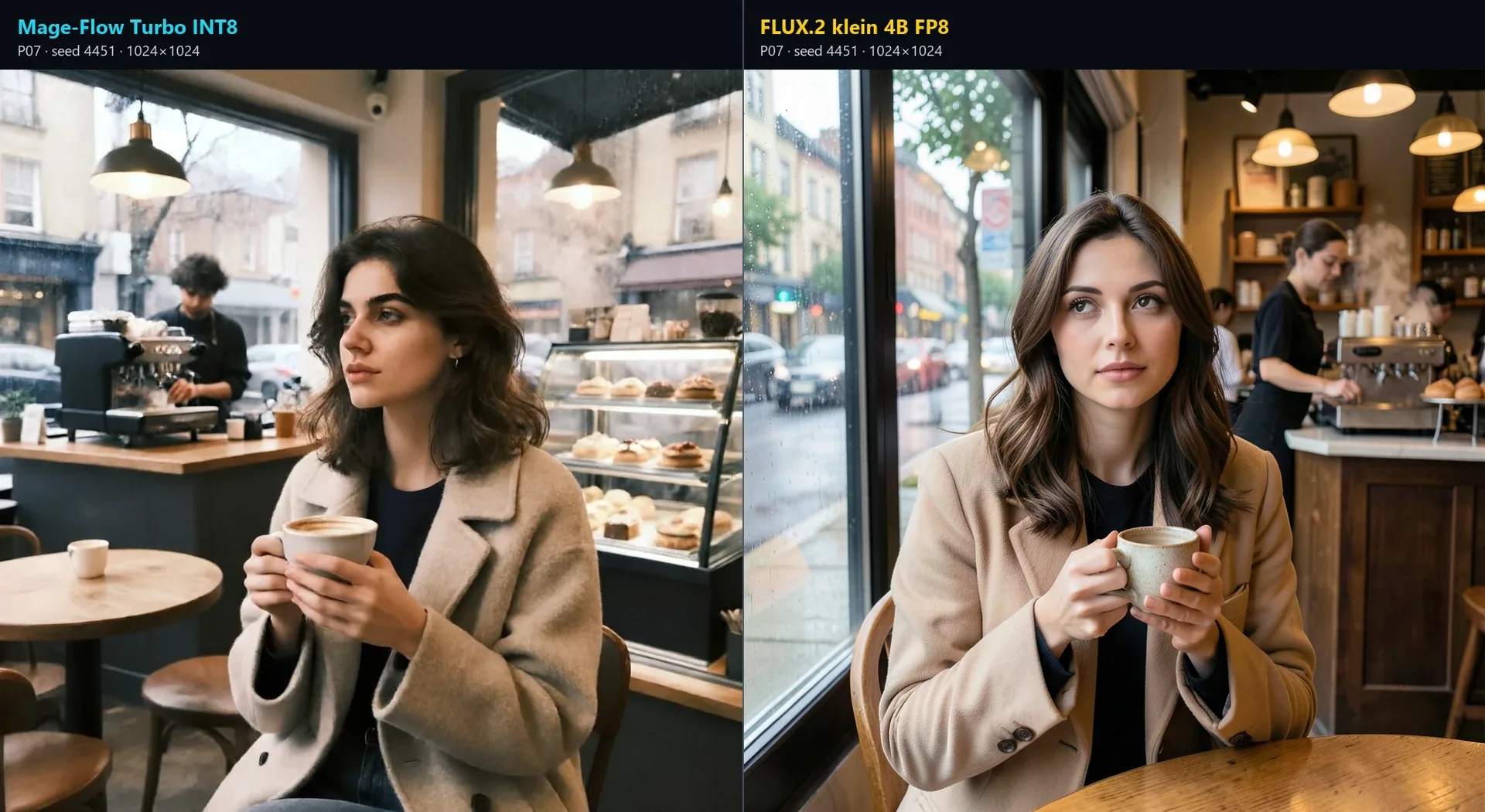
Both café images are usable at normal viewing size.
FLUX delivers cleaner facial features and better material separation, while Mage-Flow preserves a convincing everyday composition and the requested barista context. At the same time, this comparison is a useful reminder that neither model is fully reliable on hands: FLUX appears to introduce an extra finger on the left hand, while Mage-Flow shows a similarly questionable hand structure, even if the extra finger is less explicitly visible.
The train scene produced the clearest anatomy and interaction difference. Mage-Flow gives the woman two hands around the phone plus another hand on the tote bag. FLUX correctly separates the requested one-hand phone interaction from the other hand resting on the bag.
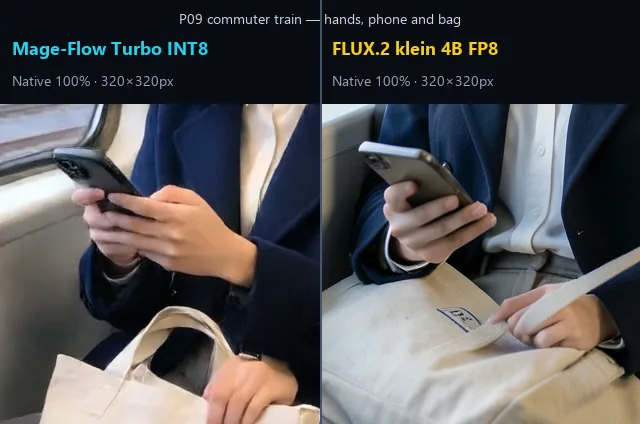
The native crop shows why the full-image difference is not just sharpness: the Mage-Flow subject has an additional visible hand.
This does not mean FLUX is immune to hand errors. Both models produced plausible hands in the selected Lara and café pairs, and one prompt set cannot establish a universal failure rate. The practical result is simply that FLUX was more reliable across these tested interactions.
Rendering Quality vs Prompt Adherence
The supermarket prompt requested a man comparing a red bell pepper in one hand with a green zucchini in the other.
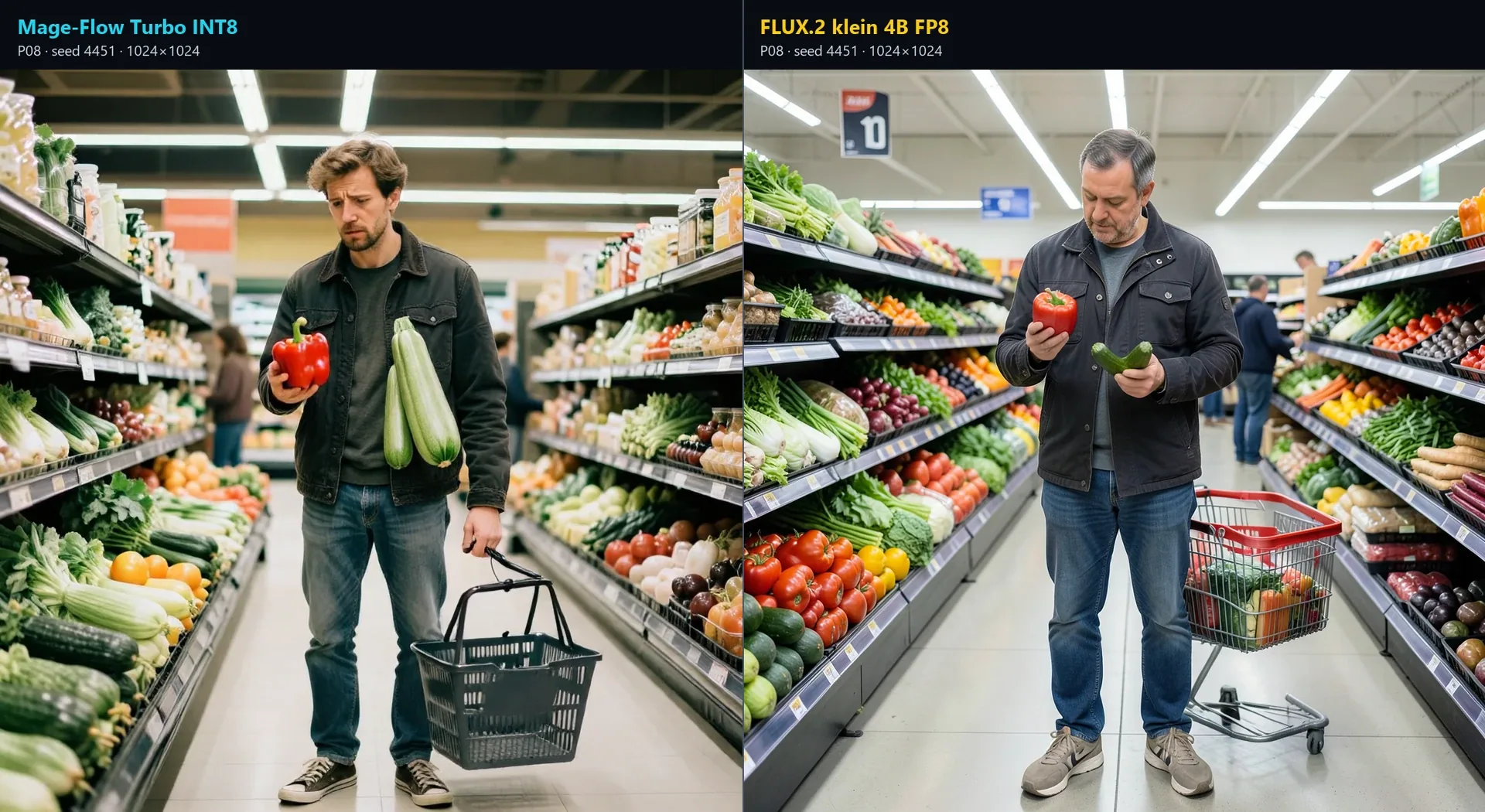
FLUX produces the more polished supermarket image, and it also handles the core shopping interaction more convincingly.
FLUX has the cleaner face, aisle structure and overall photographic finish. Its hand placement is more coherent, and the subject clearly compares two different vegetables, even if the green one reads more like a cucumber than a zucchini. Mage-Flow, by contrast, shows a weaker hand structure, turns the comparison into a red pepper and two zucchinis, and renders the surrounding produce less clearly. In this pair, FLUX is not only cleaner visually, but also more convincing in the overall scene logic.
The same distinction applies to materials. FLUX generally separated surfaces more clearly, as the Samus armor crop shows, but neither model reproduced every canonical design element exactly.
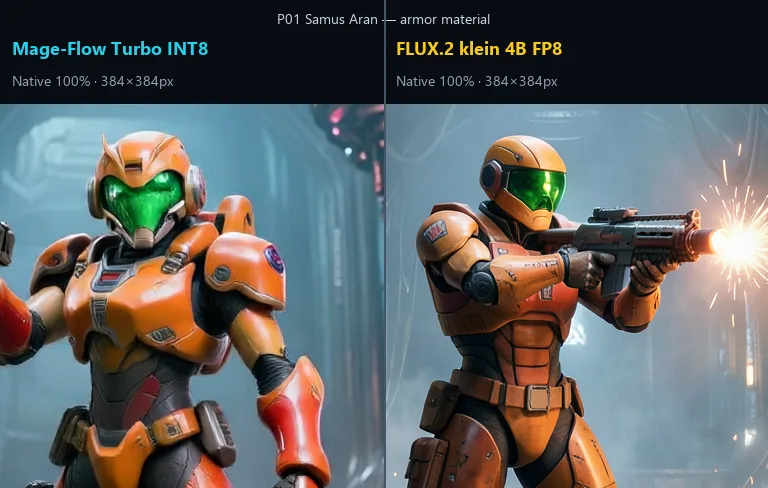
FLUX gives the armor more controlled panel structure and surface separation. Both interpretations remain approximate rather than canonically exact.
The visual review was direct and labelled. It was not a blind vote, and I did not create a subjective numerical score or manufacture a win rate. These observations are my own inspection of the full images and native crops.
Which Compact Model Should You Use?
Choose Mage-Flow Turbo INT8 when:
- minimum latency is the main constraint;
- you want to explore many prompts and seeds quickly;
- a softer draft is acceptable;
- the result will be viewed small or used as an intermediate concept;
- lower host-memory pressure matters.
Mage-Flow can produce usable directions in only a few seconds. That immediate iteration loop is a real workflow advantage, even when the first output is not the final one.
Choose FLUX.2 klein 4B FP8 when:
- face and hand consistency matter;
- object interactions need to be more reliable;
- material separation and background geometry matter;
- everyday photographic realism matters;
- roughly two to three times longer generation is acceptable;
- an eight-to-nine-second 1024×1024 result is still fast enough.
Between these two compact pipelines, FLUX is the model I would choose for general image generation. The additional wait is usually small enough to justify the improvement in structure and finish.
Final Verdict
Between these two tested compact pipelines, FLUX.2 klein is the model I would choose for general local image generation. It is slower than Mage-Flow, but most 1024×1024 images still arrive in roughly eight to nine seconds, and the improvement in faces, hands, materials and background structure is usually worthwhile.
Mage-Flow still has a clear role when latency is the primary constraint. It can create usable drafts in only a few seconds and applies less pressure to host memory. It also preserved some requested scene details more explicitly, including the supermarket produce comparison and the Halo ring cue.
The result is not “FLUX wins everything.” It is:
- Mage-Flow wins on immediate iteration.
- FLUX.2 klein wins on the overall quality/speed balance.
- Prompt adherence and canonical fidelity still need to be judged separately from visual polish.
Krea 2 remains the higher-quality reference from the previous article, but it answers a different question and was not included in this new generation pass.
Workflows and Prompt Downloads
The ComfyUI workflows and prompt setups used for this article are available in the companion repository:
What did you think of this post?
Share your feedback in one click!
Comments (0)
Join the discussion and share your thoughts
Leave a comment
No comments yet. Be the first to share your thoughts!
Related Articles
Continue reading with these posts and tutorials

Mage-Flow vs Krea 2 Turbo on 12GB VRAM
A 60-image ComfyUI benchmark comparing generation speed, memory usage, character fidelity, photography and image quality on an RTX 3060 12GB.
Jul 28, 2026
Krea 2 Turbo Resolution Test: 1MP vs 4MP on 12GB VRAM
A technical resolution benchmark of Krea 2 Turbo scaling from 1MP to 4MP with 12GB VRAM
Jul 15, 2026

Krea 2 Raw vs. Turbo in ComfyUI: Is Raw Worth the Wait?
A detailed timing and quality comparison benchmark of Krea 2 Turbo vs. Raw vs. Raw + Turbo LoRA on an RTX 3060 12GB under ComfyUI.
Jul 14, 2026